

SpinBoss Puts the Full Casino in Your Pocket with No App Download Needed
Play instantly on any mobile browser with one-tap Create Shortcut access
Trusted by Canadian players
SpinBoss Casino App and Mobile Play
SpinBoss has no downloadable app. Instead, its fully responsive site runs on any iOS or Android browser, giving access to games, live casino, sportsbook and account tools. Use Create Shortcut to add a home-screen icon without an app store download.
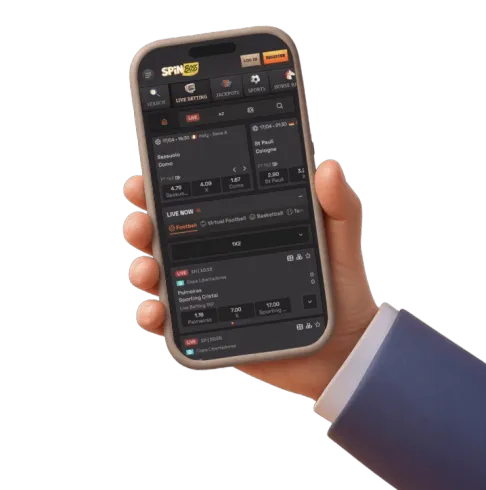
Playing On Mobile At SpinBoss Casino Without A Separate App Download
We built our platform so that everything works directly through your phone or tablet browser, without asking you to download anything from an app store. There is no native SpinBoss app for iOS or Android, and we say that upfront because we know some players specifically search for an app apk or an app store listing. What we offer instead is a fully responsive mobile site that carries every feature of the desktop experience onto your phone, accessible the moment you open your browser and load spinboss4.com.
This approach means there is no app size to worry about, no storage taken up on your device, and no separate install file to track down and verify. You simply visit our site on your mobile browser, log in, and everything from the games lobby to the cashier is right there. It also means updates happen instantly on our end, so you are always using the current version of the site without needing to download an update yourself.
Why We Do Not Offer A Downloadable App
A lot of online casinos market a mobile app, but many of those are actually just a wrapped version of the mobile website packaged into an APK or iOS build. We chose to skip that extra layer and focus on making our mobile browser experience as complete and reliable as possible. This has a few practical advantages worth understanding:
- No app apk file to download from outside official stores, which removes a common source of security concern with unofficial casino apps
- No iOS or Android version requirements to check before you can play
- No app updates to install manually — every improvement rolls out automatically on the website
- Instant access across any device with a modern browser, including tablets and less common phone models
Setting Up A Home-Screen Shortcut For Faster Access
While we do not have an app in a store, we do offer a Create Shortcut feature that gets you very close to that same convenience. This lets you add an icon for SpinBoss straight onto your phone’s home screen, so you can open the site with a single tap instead of typing the address or digging through browser bookmarks every time. It is a genuinely useful middle ground between a bookmark and a full native app installation.
How The Shortcut Works In Practice
The process draws on a browser feature available on both iOS and Android that turns any website into what looks and behaves like an app icon:
- Open your mobile browser and log in to your account on spinboss4.com
- Find the Create Shortcut option through your browser’s menu or the prompt on our site
- Confirm the shortcut, and an icon is added to your home screen
- Tap that icon anytime to launch straight into the site, bypassing the browser address bar
Once that icon is in place, launching the site feels almost identical to opening a dedicated app — it opens in its own window without the usual browser tabs and address bar cluttering the screen. For players who want app-like convenience without app-store friction, this is the feature to use.
What You Can Actually Do On Mobile
Everything available on the desktop version of our site is also available through the mobile browser. We have not held back features for a separate app tier or limited certain sections to desktop only. That includes:
- The full games lobby, covering our slot library from providers like Playson, Hacksaw Gaming, Betsoft, Yggdrasil, Microgaming and Stakelogic
- Live casino tables, including roulette, blackjack, baccarat, poker variants and game-show style titles
- The full sportsbook, with live betting across soccer, tennis, table tennis, basketball, hockey, football, baseball and volleyball, plus horse racing markets
- Promotions and the VIP club, so you can track offers and loyalty progress from your phone
- Full account management, deposits, withdrawals and bonus claims
- Customer support, available around the clock through live chat and email
This matters because a common frustration with app-only casino platforms is a stripped-down games list or missing features compared to desktop. Since our mobile experience is the same site rendered responsively, rather than a separate limited build, you are not choosing between convenience and completeness. If you want to browse our full slot range in more depth, our online slots page breaks down the providers and game categories, and our live casino page covers the dealer tables in detail.
Depositing And Withdrawing From Your Phone
Banking works identically on mobile as it does on desktop, since it is the same cashier interface, just resized for a smaller screen. You can fund your account using Interac, Visa or Mastercard, Skrill, Neteller, or a range of cryptocurrencies including Bitcoin, Ethereum, Litecoin, USDT across several networks, and others. Interac deposits start from $10, while most other methods have a $20 minimum, and Bitcoin specifically requires a $45 minimum deposit given typical network transaction sizing. For the complete breakdown of limits, processing times and every supported method, our payment methods page covers deposits and withdrawals in full detail — this page focuses purely on the mobile experience itself.
Practical Considerations For Playing On A Small Screen
Moving from a desktop monitor to a phone screen changes how you interact with certain game types, and it is worth understanding those differences before you settle into a session. Slot games generally translate well to mobile because their vertical or near-square layouts fit phone screens naturally, and touch controls for spinning, adjusting bet size, and triggering bonus features tend to feel intuitive. Live dealer tables and detailed table games like blackjack or poker variants can require a bit more attention to screen space, since betting grids and multiple hand positions need enough room to tap accurately.
A few habits make mobile play smoother regardless of which games you are exploring:
- Use landscape orientation for live dealer tables and sportsbook bet slips where more information is displayed at once
- Keep your browser updated to the latest version so page rendering and touch responsiveness stay sharp
- Check your connection stability before starting a live dealer session, since live video streams need a steadier connection than static slot graphics
- Log out properly when finished, particularly on shared or public devices, to keep your account secure
Account Security On Mobile Devices
Security does not change just because you are on a phone rather than a desktop. All transactions across our platform run through SSL encryption, and we apply the same account verification and payment checks regardless of which device you use to log in. Before your first withdrawal, we require photo ID, proof of address and proof of your payment method, a standard part of keeping accounts protected and compliant. If you are logging in from a new phone or a shared device, treat your login credentials the same way you would on desktop, and avoid saving passwords on devices other people can access. Our login and registration page has more detail on setting up and accessing your account securely.
Bonuses And Promotions Function The Same Way On Mobile
Claiming and tracking promotions from your phone works exactly as it does on desktop, since bonuses are credited to your account balance rather than tied to a specific device or app. New players exploring the site on mobile for the first time can review our welcome bonus package directly from their phone, check wagering progress in the promotions section, and opt into reload offers or cashback promotions without needing to switch to a desktop browser at any point. The VIP club, tournament leaderboards, and daily reward features like the Wheel of Fortune are all reachable through the same mobile menu structure as the rest of the site.
Choosing Between A Browser Bookmark And The Home-Screen Shortcut
Some players stick with a simple bookmark, typing in the address or tapping a saved link in their browser each time. Others prefer the Create Shortcut option because it removes even that small step and behaves more like tapping an app icon. Neither choice affects your account, your game history, or your bonus progress, since all of that lives on our servers tied to your login rather than to the device or access method you use. Try both for a session or two and settle on whichever fits your habits — the shortcut tends to suit players who play daily, while a bookmark is often enough for more occasional sessions.
Playing responsibly matters just as much on mobile as anywhere else, and our platform is intended for players 18 and older. We provide deposit limits, session controls and self-exclusion options that apply across every device, so you can set boundaries once and have them respected whether you play from your phone, tablet, or desktop. Details on these tools sit in our Responsible Gaming policy in the site footer, and we would rather you use them proactively than reach for them after a difficult session.
Getting started on mobile takes a few minutes: open your browser, head to spinboss4.com, log in or register, and add the home-screen shortcut if you want one-tap access going forward. From there, the games, the sportsbook, the promotions and your account sit exactly where you left them on desktop, just resized for the screen in your hand. If you are ready to see what that looks like for yourself, log in or create an account with SpinBoss and pick up your session right from your phone.